How to Send Money from Canada to India: A Complete Guide
How to send money from Canada to India: CAD to INR conversion, funding in CAD, USDT or USDC, INR payout to an Indian bank account, and what to compare before you send.

People in Canada send money to India to support family, pay education costs, cover living expenses, or move personal funds. A Canada to India international money transfer is paid out in Indian rupees (INR) to an Indian bank account. How the sender funds the transfer can vary.
The amount that reaches the recipient is not only the sum you send. It also depends on the funding currency, the conversion applied to that transfer, applicable fees, payout conditions, and processing. On PrivatePay, you can fund a Canada → India transfer in Canadian dollars (CAD) or in supported stablecoins such as USDT and USDC. In every case described here, the recipient receives INR in their Indian bank account — not CAD, USDT, or USDC. This guide does not quote a live rate, a fee schedule, or a guaranteed delivery time.
How can you send money from Canada to India?
You can send money from Canada to India with PrivatePay by funding your transfer in CAD or supported stablecoins such as USDT and USDC. After adding the recipient’s Indian bank details, you can review the applicable conversion and fees before confirming the transfer. The recipient receives INR directly into their Indian bank account.
A typical PrivatePay transfer follows this sequence:
- Create and verify your PrivatePay account. Identity verification is required before an international money transfer can be processed.
- Choose how you want to fund the transfer. Choose your currency in the transfer flow.
- Fund the transfer using CAD, USDT, or USDC. These are the funding options described for this Canada → India route.
- Add the recipient’s Indian bank account details. Use the name and account information as they appear at the bank in India.
- Review the applicable conversion, fees, and INR payout amount. Check what you provide, what it costs, and how much INR the recipient is expected to receive.
- Confirm the transfer. Once you accept the quote and complete funding, the transfer is submitted for processing.
- The recipient receives INR in their Indian bank account. Delivery then depends on processing and the recipient bank in India.
On PrivatePay, you log in, enter the recipient’s details, choose your currency, confirm the rate, and submit. For this Canada → India route, PrivatePay pays INR to an Indian bank account. Review the live quote in your account rather than a published mid-market rate.
CAD to INR: how currency conversion works
For transfers funded in Canadian dollars, the transfer involves converting CAD into Indian rupees (INR). CAD to INR is a common way people in Canada send money to India, and it remains the conversion this section explains. PrivatePay also supports funding with USDT and USDC, with the recipient still receiving INR in their Indian bank account.
One CAD is not a fixed number of rupees: the CAD/INR exchange rate moves over time, and the rate applied to your transfer may differ from a mid-market figure you see elsewhere.
An illustration of sending 1,000 CAD:
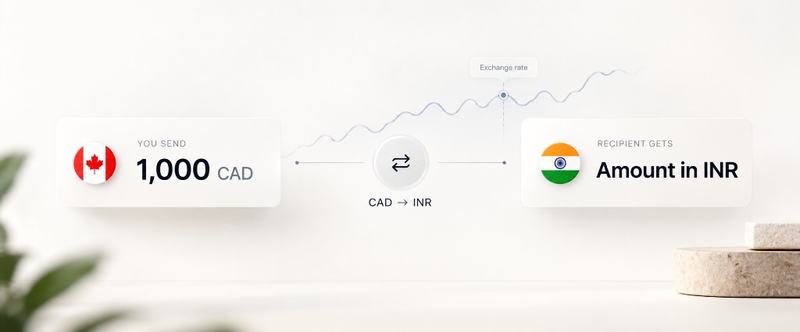
- You send: 1,000 CAD
- Currency conversion: CAD → INR
- Recipient receives: the resulting amount in INR after the applicable exchange rate and fees
This article does not hardcode a CAD/INR rate or an INR amount. The relevant figure is the rate shown when you review the transfer.
Can you send USDT or USDC to India with PrivatePay?
Yes. PrivatePay supports funding Canada → India transfers with USDT and USDC. The recipient does not receive cryptocurrency. After conversion, they receive INR directly into their Indian bank account.
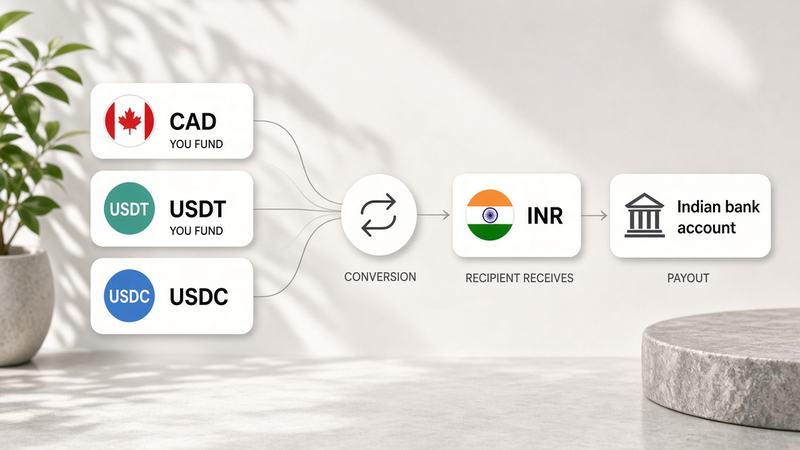
The distinction is:
- Sender funds with: CAD, USDT, or USDC
- Recipient receives: INR in an Indian bank account
USDT- and USDC-funded transfers on this route are still INR bank payouts, not a crypto payout to a wallet in India. This article does not quote USDT/INR or USDC/INR rates, networks, wallet requirements, or crypto-specific fees. Review the conversion, fees, and INR amount shown for your transfer.
What determines how many rupees the recipient receives?
The INR credited to the Indian bank account depends on how much you provide, in which currency you fund the transfer, the conversion applied to that transfer, fees, and payout or banking conditions. The same funding amount can produce a different INR total if the currency, rate, or fees differ.
- Funding amount — how much you send.
- Funding currency — CAD, USDT, or USDC on this PrivatePay route.
- Applicable conversion rate — the rate applied from the funding currency into INR for that quote.
- Applicable fees — charges shown on the quote.
- Banking and payout conditions — here, INR paid to an Indian bank account.
- Intermediary or banking charges — where they apply, these can affect the credited amount or timing and may not always appear on the first quote.
How much the sender provides → Total applicable costs → How much INR reaches the Indian bank account
Compare what leaves you with what the recipient receives in INR, not the fee line alone.
How much does it cost to send money from Canada to India?
The total cost of a Canada to India money transfer can include a transfer fee, currency conversion from the funding currency into INR, any conversion markup or spread, and banking or intermediary charges where they apply. Conversion is often a large part of the cost even when the advertised fee looks small.
This article does not state that PrivatePay is the cheapest, that fees are zero, or that a specific fee applies to CAD, USDT, or USDC. Pricing depends on the amount, the funding currency, the rate at the time you send, and the details of that quote.
Before you confirm, review the applicable conversion, fees, and the final INR amount for the Indian bank account payout.
How long does a transfer from Canada to India take?
Processing time for an international money transfer from Canada to India is not a single fixed number. It can depend on how you fund the payment, the recipient bank, the accuracy of recipient information, account verification, compliance checks, banking processing periods, and weekends or banking hours.
Transfers can take longer when:
- verification is incomplete or extra documents are requested;
- recipient details do not match the bank’s records;
- additional compliance checks apply;
- the recipient bank is still processing the INR credit.
Check any timing shown for your transfer. This article does not give a guaranteed PrivatePay delivery window for India, and it does not invent separate settlement times for CAD, USDT, or USDC.
What information do you need to send money to an Indian bank account?
The exact fields depend on the transfer provider and the banking route. You typically need the recipient’s full name as it appears at the bank, the Indian bank account number, the bank name, and — where the route uses it — the IFSC that identifies the branch. Some transfers also ask for a purpose of payment and other branch details.
- Recipient’s full name
- Bank account number
- Bank name
- IFSC code where applicable
- Other bank or branch information where required
- Purpose of transfer where required
Enter the information so it matches the bank’s records. Mismatched names, account numbers, or IFSC codes are a common reason transfers are delayed or returned. Use the fields shown in your PrivatePay transfer form — those are the details required for that payout — rather than a generic checklist copied from elsewhere.
Can you send money directly to an Indian bank account?
Yes. International transfers to India can be delivered directly to an Indian bank account when the transfer service supports bank-account payouts.
On PrivatePay, the flow is:
- CAD → conversion → INR → Indian bank account
- USDT → conversion → INR → Indian bank account
- USDC → conversion → INR → Indian bank account
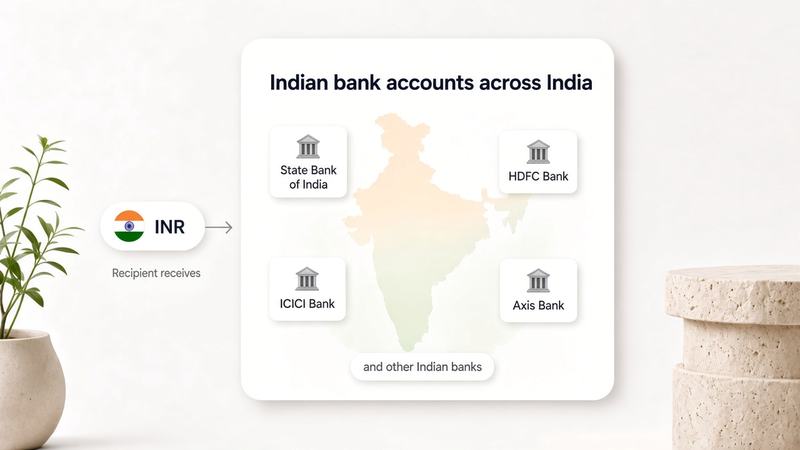
PrivatePay supports INR payouts to Indian bank accounts for this Canada → India route, including accounts at banks across India. The recipient receives Indian rupees in that account. They do not receive CAD, USDT, or USDC through this payout.
How do bank transfers to India work?
The recipient bank in India receives an INR credit for the customer whose account details you entered. In this flow the Indian account is not credited in CAD, USDT, or USDC: the funding currency is converted, then the payout is made in Indian rupees.
Accurate bank details matter because the credit has to match an existing account. If the name, account number, or branch identifier is wrong, the bank may delay, reject, or return the payment.
IFSC (Indian Financial System Code) identifies bank branches in India for electronic payments. Where your transfer form asks for IFSC, use the code for the recipient’s branch.
Common reasons for sending money from Canada to India
Canada–India remittance is often used for family, education, living costs, and personal funds. In each case the payout described here is INR to an Indian bank account, whether you fund the transfer in CAD, USDT, or USDC.
Family support
Sending money to relatives in India for regular household or personal expenses, credited to their Indian bank account.
Education and tuition
Sending funds related to education expenses in India where the student, family member, or other recipient can receive payment through their Indian bank account. This article does not describe direct billing to a university unless that option appears in your transfer.
Bills and living expenses
Helping cover rent, utilities, healthcare, or other everyday costs by transferring INR to the appropriate Indian bank account.
Personal funds
Moving personal money between Canada and India where the transfer is permitted and paid out to an Indian bank account.
If a purpose-of-transfer field is shown, choose the category that matches the payment.
What should you compare before sending money to India?
Compare the funding currency, the conversion into INR, total fees, final INR received, estimated processing time, bank payout, verification, and the recipient information required. The comparison that matters most is how much the sender provides versus how much INR reaches the recipient’s Indian bank account.
- Funding option (CAD, USDT, or USDC)
- Applicable conversion into INR
- Total fees
- Final INR amount received
- Estimated processing time
- Bank payout availability (INR to an Indian bank account)
- Verification requirements
- Recipient information required
Use a like-for-like quote for the same funding amount, the same funding currency, and the same Indian bank payout. For CAD-funded sends, that includes the CAD/INR rate applied to the transfer. See PrivatePay’s AML & KYC Policy for how identity verification works on this platform.
How to send money from Canada to India with PrivatePay
To send money from Canada to India with PrivatePay, open a verified account, choose how you will fund the transfer, add the recipient’s Indian bank account details, review the conversion, fees, and INR amount, then confirm. INR is paid out to that Indian bank account.
PrivatePay is not limited to CAD-funded transfers on this route. Both of these paths are the same product flow — different funding, the same INR bank payout:
- CAD → conversion → INR → Indian bank account
- USDT or USDC → conversion → INR → Indian bank account
- Create or log in to your PrivatePay account.
- Complete any required verification.
- Choose your currency and enter the amount you want to send in CAD, USDT, or USDC.
- Add the recipient’s Indian bank account details.
- Review the applicable conversion, fees, and INR payout amount.
- Confirm the transfer.
Use the quote in your account for the figures that apply to that payment.
Is PrivatePay regulated in Canada?
PrivatePay describes itself as a Canadian Money Services Business (MSB) providing payment and transfer services — not as a bank. For the company’s published legal information, read Legal Information.
This article does not add licences, registrations, or protections beyond what that page states.
Frequently asked questions
What is the easiest way to send money from Canada to India?
An online international money transfer from a verified account to an Indian bank account is a straightforward route, once you have the correct bank details. Compare the funding option, conversion, fees, bank payout, and final INR amount before you send. This article does not claim that PrivatePay is objectively the easiest option for every sender.
What currency will the recipient receive in India?
For the PrivatePay Canada → India route described here, the payout is in Indian rupees (INR) to the recipient’s Indian bank account. They do not receive CAD, USDT, or USDC in that account through this flow.
Can I send USDT or USDC to India with PrivatePay?
Yes. PrivatePay supports USDT and USDC as funding options for this transfer flow. You fund with USDT or USDC; after conversion, the recipient receives INR in their Indian bank account. They do not receive USDT or USDC.
How much is 1,000 CAD in Indian rupees?
There is no fixed INR amount for 1,000 CAD. In outline: 1,000 CAD × the applicable CAD/INR exchange rate, after applicable fees and costs, equals the amount received in INR. Check the quote for 1,000 CAD rather than using a rate from this page. Quotes funded in USDT or USDC will show a different conversion into INR.
What is the CAD to INR exchange rate?
The CAD to INR exchange rate is how many Indian rupees are exchanged for one Canadian dollar. It changes over time. Review the rate that applies when you prepare a CAD-funded transfer. If you fund in USDT or USDC, review the conversion shown for that currency into INR instead.
How long does it take to send money from Canada to India?
It depends on funding, verification, the recipient bank, the accuracy of bank details, compliance checks, and banking hours. This article does not promise a specific PrivatePay timeframe for India, including for USDT or USDC funding. Use any estimate shown on your transfer.
Can I send money directly to a bank account in India?
Yes. PrivatePay supports INR payouts to Indian bank accounts on this route, including bank accounts across India. You fund in CAD, USDT, or USDC; after conversion, INR is credited to the recipient’s Indian bank account.
What bank details do I need to send money to India?
Typically the recipient’s full name, Indian bank account number, bank name, and IFSC where applicable, plus any other fields on the form. Enter what PrivatePay asks for on that transfer so the details match the bank’s records. The payout is to the bank account, regardless of whether you funded in CAD, USDT, or USDC.
Does the recipient need a PrivatePay account?
This article describes payout to an Indian bank account using the bank details you enter. Follow the receiving instructions in your transfer rather than assuming the recipient must create a PrivatePay account.
What is the cheapest way to send money from Canada to India?
Compare total cost and the INR that reaches the Indian bank account, not only the headline fee. Quotes can differ by funding currency. There is no single cheapest option for every amount. This article does not name PrivatePay as the cheapest provider, and it does not claim that USDT or USDC is cheaper than CAD.
Is it safe to send money to India online?
Use a legitimate payment provider, verify the recipient’s Indian bank details with them, protect your login, and review the funding amount and currency, conversion, fees, and INR payout before you confirm. PrivatePay’s published legal information is on the Legal Information page. This is not a guarantee against fraud or bank rejection.
Send money from Canada to India
Before you confirm, choose the funding option — CAD, USDT, or USDC — then review the applicable conversion, applicable fees, the INR amount the recipient will receive, and the recipient’s Indian bank details. The payout is always INR to an Indian bank account.
